Batch, Lot & Expiry Tracking Software
Track goods by batch number, monitor expiration dates, eliminate perishable waste, and maintain end-to-end traceability for compliance.
What is batch and expiry tracking software?
Batch and expiry tracking software tracks inventory by distinct manufacturing lots and expiry dates, allowing businesses to trace where each batch came from, when it expires, and which customers purchased it.
What Likhtam delivers for this workflow.
Real features engineered for real business operations, not generic templates.
Lot & Batch Identification
Record unique batch/lot numbers upon inward purchase or manufacturing completion.
Manufacturing & Expiration Dates
Store manufacturing and expiration dates per lot to support FEFO (First Expired, First Out) picking.
Near-Expiry Alerts
Identify products nearing expiration weeks in advance so you can prioritize sales or clear stock.
Comprehensive Batch Traceability
Instantly view which supplier delivered a specific batch and which customers purchased units from that lot.
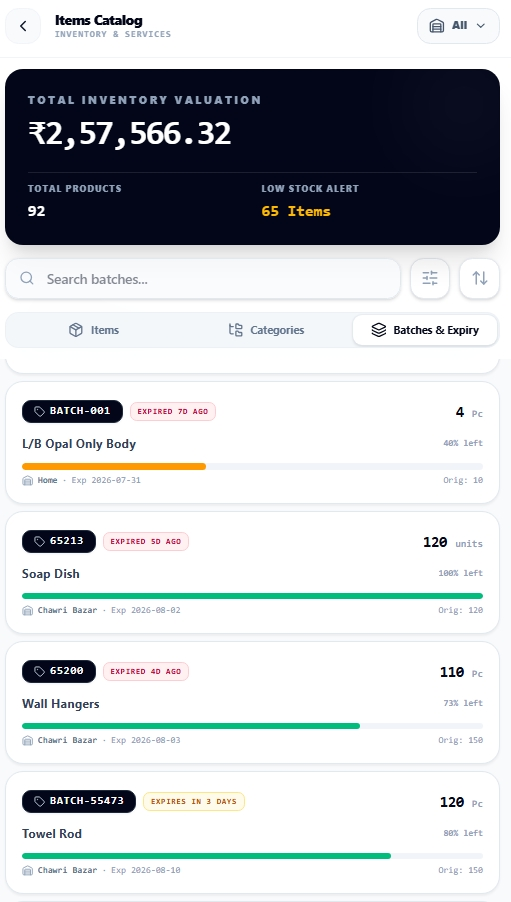
Live Product Batch-wise stock register with expiration dates and quantity remaining
How it works from start to finish.
A clear, step-by-step process designed to keep your books completely balanced.
Enter Inward Batch Details
When entering purchase bills or manufacturing completions, enter the batch code and expiry date.
Lot-Wise Stock Overview
View current quantities on hand split by individual batch numbers.
Select Batch on Invoicing
Pick the specific batch to ship; the invoice displays the batch and expiry information for customer clarity.
Batch Recall & Audit
Filter transactions by batch number to inspect entire supply chain movements in seconds.
Designed specifically for:
- Pharmacies and pharmaceutical distributors complying with drug regulations
- Food, beverage, and dairy processors managing perishable goods
- Cosmetics, chemical, and paint manufacturers monitoring shelf-life batches
Factual questions, straight answers.
Clear details about Likhtam's capabilities, offline support, and compliance.
Yes. Customer invoices clearly display the item batch number, manufacturing date, and expiry date as required for pharma and food compliance.
Yes. Different batches of the same product can have different purchase costs and expiration dates while maintaining unified sales tracking.
Ready to run your books with total clarity?
Free forever on your phone or PC. Optional cloud sync and multi-user access when you need it.