Inventory Software with Expiration Date Tracking
Monitor product shelf life, record batch numbers at purchase receipt, prioritize older lots with FEFO dispatch, and eliminate expired stock write-offs.
How does expiration date tracking software protect inventory margins?
Expiration date tracking software assigns manufacture and expiry dates to inventory lots upon supplier purchase, provides early warnings for items approaching shelf-life expiration, and guides staff to dispatch older lots first (FEFO) to avoid costly product write-offs.
What Likhtam delivers for this workflow.
Real features engineered for real business operations, not generic templates.
Batch Lot & Expiry Capture on Purchase
Log supplier batch numbers, manufacture dates, and expiration dates during goods inward entry.
Near-Expiry Inventory Reporting
Review upcoming expiration schedules sorted by remaining days of shelf life to discount or return aging stock.
First-Expired, First-Out (FEFO) Dispatch
When generating sales bills or delivery challans, select lots based on expiry dates to sell older inventory first.
Expired Product Warning Alerts
Software displays immediate alerts if an operator attempts to bill or dispatch an expired inventory batch.
Invoice Expiry Date Disclosure
Print batch numbers and expiration dates directly on customer invoices, ensuring consumer safety and regulatory compliance.
Documented Damaged & Expired Write-Offs
Record unsellable or expired product disposal with dedicated stock adjustment vouchers that update accounting books accurately.
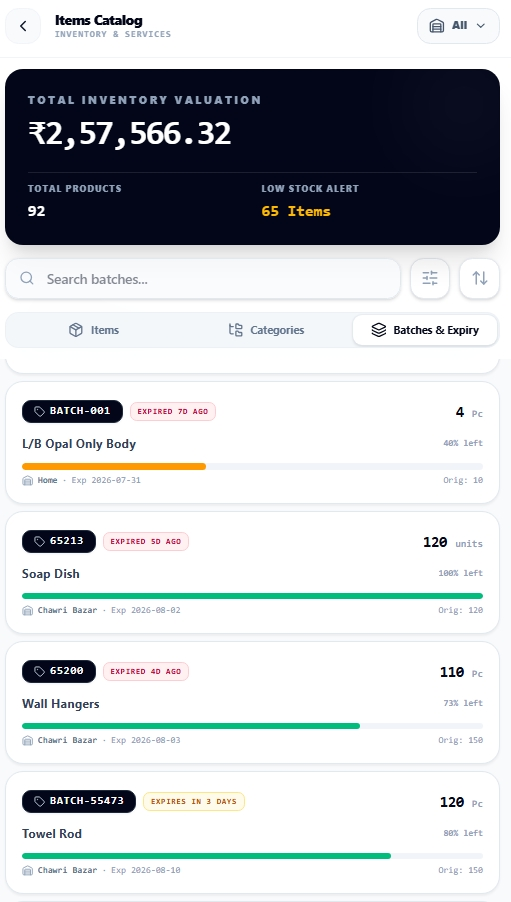
Live Product Likhtam batch tracking: manufacturing and expiry dates, remaining shelf-life days, and lot balances
How it works from start to finish.
A clear, step-by-step process designed to keep your books completely balanced.
Capture Batch & Expiry at Inward
Record batch numbers, manufacturing dates, and expiration dates during purchase bill entry.
Lot-Wise Stock Segmentation
Inventory balances group by batch ID, showing exactly how many units belong to each expiry date.
Monitor Shelf-Life Horizons
Run periodic Expiry Reports to flag products expiring within 30, 60, or 90 days.
FEFO Outward Billing
Select the earliest expiring lot when invoicing customers to keep inventory fresh.
Reconcile or Write-Off Expired Stock
Return near-expiry stock to vendors or log disposal adjustments to maintain accurate asset valuations.
Designed specifically for:
- Pharmaceutical distributors, chemist shops, and medical wholesalers adhering to mandatory drug expiry guidelines
- FMCG distributors, packaged food processors, and beverage suppliers managing perishable shelf life
- Cosmetics, skincare, and chemical distributors requiring batch lot traceability and quality control
Factual questions, straight answers.
Clear details about Likhtam's capabilities, offline support, and compliance.
Yes. Invoices, cash memos, and delivery challans can display the exact batch ID and expiration date for each line item.
Yes. Likhtam alerts operators if a selected batch has passed its expiration date, preventing inadvertent sales of expired goods.
Yes. Likhtam is widely used by pharmacies, medical distributors, food stockists, and cosmetic stores requiring batch and expiry compliance.
Yes. Likhtam stores all batch records and expiration dates locally on your device, allowing full offline operation.
Ready to run your books with total clarity?
Free forever on your phone or PC. Optional cloud sync and multi-user access when you need it.